

The short answer
Traffic quality measures how much of your website traffic comes from real, genuinely interested people versus bots, automated agents, and other invalid sources. You can gauge it by watching for the signs of fake traffic — near-zero engagement time, ~100% bounce, spikes from data centers or countries you don’t serve, spammy referrers, and high traffic with no conversions. Google Analytics only filters known bots, so the reliable way to measure and protect traffic quality is a detection tool that analyzes every visit in real time across paid, organic, and direct — which is exactly what ClickCease does.
TL;DR
- Traffic quality is the share of your visitors who are real humans with genuine intent — not bots, scrapers, or automated agents. In 2026, about 22% of traffic across the ClickCease network was invalid (median site: 17%).
- GA4’s automatic bot filtering only catches known bots on the IAB list — treat it as a floor, not a solution. It misses referral spam, ghost hits, headless browsers, and AI crawlers.
- Tell-tale signs of fake traffic: sub-second sessions, ~100% bounce, no scroll or engagement, data-center IPs, unfamiliar geographies, spammy referrers, gibberish UTMs, and high traffic with near-zero conversions.
- Analytics filters are reactive — they clean reports after the fact. Blocking invalid traffic at the source, before it hits your site and your forms, is the durable fix.
- The strongest tools monitor quality across every channel (paid, organic, direct) and screen your forms — where ClickCease and Lead Shield come in.
New to the terminology? Start with our primer on what invalid traffic (IVT) is — including GIVT vs SIVT — then come back here for how to measure and protect your own traffic quality.
What is traffic quality — and why does it matter?
Traffic quality is a measure of how genuine and valuable your website visitors are. High-quality traffic comes from real people with real intent who read, engage, and convert. Low-quality traffic is the opposite: bots, scrapers, automated agents, click farms, and spam that inflate your numbers without ever becoming a customer.
It matters because every metric you make decisions on sits downstream of it. When invalid traffic is counted as real, your sessions are inflated, your bounce and conversion rates are distorted, your cost-per-acquisition looks wrong, and your ad platforms learn from the wrong signals. You end up optimizing toward noise — and in lead-generation businesses, that noise becomes fake leads clogging your CRM.
How do I know if my website traffic is real? Signs of fake or junk traffic
No single metric proves traffic is fake — you look for a cluster of signals. These are the most reliable red flags:
🚩 Signs of fake or junk traffic
- Zero-second sessions and ~100% bounce — humans take a few seconds to read; bots don’t.
- No scroll, no clicks, single-page visits — sessions with only a pageview event and no interaction.
- Traffic from data centers or countries you don’t serve — a sudden surge from one foreign city or hosting-provider IP range is rarely real customers.
- Spammy referrers and gibberish UTMs — random-looking domains or campaign parameters that match nothing you’re running.
- Suspiciously regular patterns — near-identical session counts every day, or spikes at odd hours, suggest scheduled bots.
- High traffic, low conversions — the single clearest business signal that a source is sending you visitors who were never going to buy.
How to spot fake traffic in Google Analytics (and clean it up)
GA4 gives you the raw material to spot fake traffic, even though it won’t remove it all for you. Its automatic bot filtering is always on, but it only excludes known bots on the IAB/ABC list — anything designed to look human sails straight through. Here’s how to audit it:
- Sort Traffic acquisition by sessions and add average engagement time. High-volume sources with near-zero engagement are almost always automated.
- Audit your Referral report for domains you don’t recognize with 0% engagement and 100% bounce — classic referral spam.
- Check the Hostname dimension to catch “ghost” spam: measurement-protocol hits sent straight to your property will show a hostname that isn’t yours (or “(not set)”).
- Watch Direct / (none) spikes with no campaign behind them — a common ghost-traffic signature.
- Segment by engagement (scroll fired, session >10s, or 2+ pageviews) to compare “real” vs “junk” and see how much of your data is noise.
To clean it up, GA4 lets you exclude internal traffic by IP, build data filters, and create engagement-based segments. But there’s a catch: these filters are reactive. Spammers rotate domains and send ghost hits that never touch your site, so you’re always cleaning up after the fact — and your stored data stays polluted. The durable fix is validating each visit in real time and blocking invalid traffic before it reaches your site and your analytics.
Why is my traffic high but conversions low?
It’s the most common symptom of a traffic-quality problem. If sessions are climbing but conversions aren’t, a large share of those visitors were never human — or never had intent. Bots inflate the top of your funnel and evaporate before the bottom. Worse, in lead-gen businesses the “conversions” themselves can be fake: automated form fills that register as leads, skew your acquisition costs, and send sales reps chasing prospects who don’t exist. High traffic with low genuine conversion is the clearest sign it’s time to measure quality, not just volume.
How to identify, verify, and block low-quality traffic sources
Identify low-quality sources by ranking each source/medium on engagement and conversion, not sessions. A source sending hundreds of visits and zero meaningful engagement is a junk source, however impressive the volume looks.
Verify whether a source is legitimate by checking the fingerprints behind it: is the traffic coming from residential ISPs or from data centers and VPNs? Does the geography match your market? Do the device/browser combinations make sense? Real audiences look messy and human; bot sources look mechanical and uniform.
Block what you confirm as invalid. You can block IP ranges and geographies at the server or firewall level, exclude spam referrers in analytics, and — most effectively — use a detection tool that identifies invalid visitors in real time and blocks them at the source, while automatically adding them to exclusion audiences across your ad platforms so they can’t keep costing you money.
How to protect your website and funnel from fake traffic
Most teams only think about protecting paid traffic. But bots arrive through organic search, direct visits, and referrals too — and they don’t stop at the ad. Protecting traffic quality means covering the whole journey:
- Your whole site, not just campaigns — real-time detection across paid, organic, and direct keeps your analytics and remarketing audiences clean.
- Your CMS — on WordPress, a bot-mitigation layer blocks malicious bots at the site level before they slow your site, hit your checkout and login pages, or spam comments.
- Your forms — the end of the funnel is where fake traffic does the most damage. Screening every submission keeps bots, fake emails, and synthetic identities out of your CRM.
How to measure and monitor traffic quality across every channel
Improving traffic quality starts with measuring it honestly — and the biggest gap in most stacks is that quality is measured per-channel, in silos. Your ad platforms report their own numbers, your analytics reports another, and nothing gives you a single, comparable view of real vs. fake across everything.
When evaluating traffic-monitoring tools, look for four things:
- All channels, one view — paid, organic, and direct together, not just paid clicks.
- Real detection, not a known-bot list — behavioral analysis that catches sophisticated and automated traffic GA4 misses.
- Blocks at the source — stops invalid traffic in real time, rather than only cleaning reports afterward.
- Covers your forms — screens submissions so quality protection reaches the end of the funnel.
How this relates to ClickCease
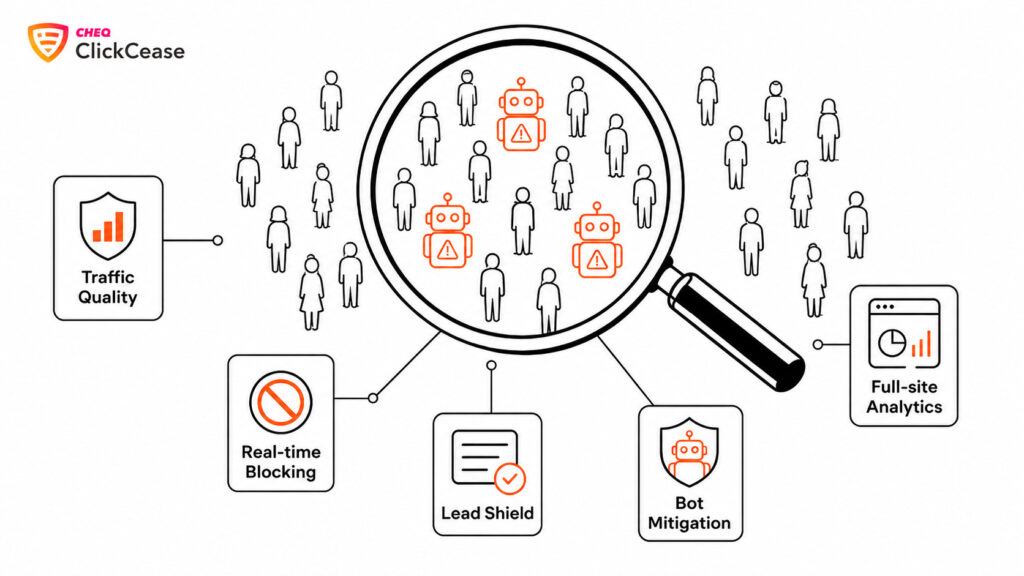
ClickCease is built around exactly this problem. It runs on the CHEQ enterprise cybersecurity engine, applying 2,000+ behavioral tests to every visit in a few milliseconds — far beyond matching a known-bot list — and it does so across your entire website, not just paid campaigns. That gives you a single, honest view of traffic quality across paid, organic, and direct in one dashboard.
Where it goes further than analytics tools:
- Full-site traffic analytics — see how much of your traffic is invalid across every channel, with the threat types and sources behind it.
- Real-time blocking — invalid visitors are stopped and automatically excluded across Google, Meta, and Microsoft, so they can’t keep burning budget.
- Bot Mitigation for WordPress and WooCommerce — a dedicated plugin that blocks bad bots at the site level, protecting organic and direct traffic across your site, WooCommerce stores included.
- Lead Shield — screens every form submission and writes a verdict into your CRM, so fake traffic never becomes a fake lead.
🛡 Bot Mitigation: protection built into your WordPress site
Analytics tools only report bot traffic after it lands. ClickCease’s Bot Mitigation plugin stops it at the door. Installed on your WordPress site, it runs the CHEQ engine’s behavioral tests on incoming visitors and redirects malicious bots to a 403 “unauthorized” page before they can interact with anything — so they never slow your site, skew your analytics, or spam your blog comments. For WooCommerce stores, there’s no special setup: because WooCommerce runs on WordPress, store owners install Bot Mitigation like any other plugin. And because it works at the traffic layer, it blocks automated bots before they interact, keeps bot sessions out of your store analytics, and cuts down bot-driven checkout and login abuse, fake account registrations, and comment spam.
See your real traffic quality across every channel — paid, organic, and forms — and block what’s dragging it down. New customers currently get 30% off their first three months. Start your free 7-day trial →
Frequently asked questions
Know exactly how good your traffic is
ClickCease measures traffic quality across paid, organic, and direct, blocks invalid visitors in real time, and screens your forms with Lead Shield. Free for 7 days.
Start your free trial →· Cancel anytime · 15,000+ companies protected by CHEQ · <0.009% false positive rate

